
VidFox: AI Photo Video Maker
FANTASIATECHArt & Design
4.377.00 Reviews
- Version
- 3.9.4
- Installs
- 1.00M
- Age Rating
- Teen
Screenshots
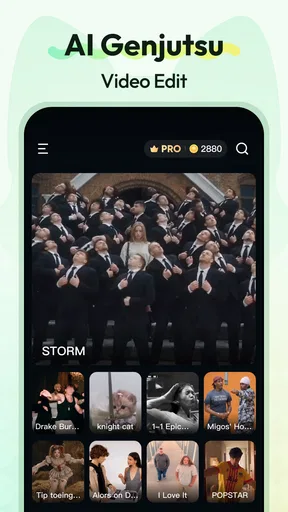
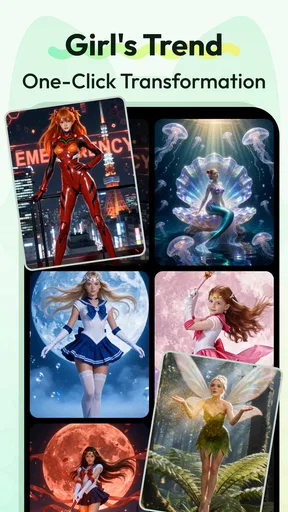

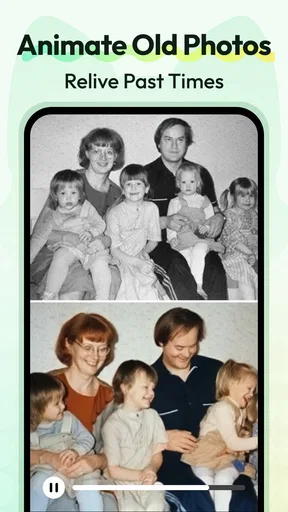

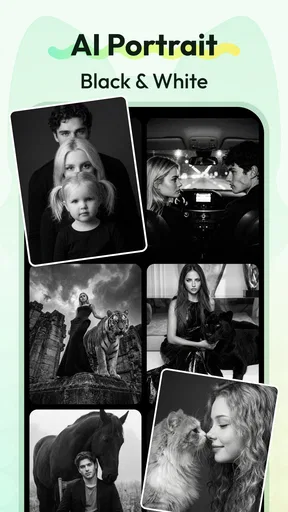


Our Review of VidFox: AI Photo Video Maker
 Analysis by Appyee
I usually get stuck with creative apps at the point where a promising idea meets too many choices. An AI video maker can sound simple, but deciding what to make, preparing the right material and getting a result that feels like your own still takes a little thought. VidFox: Al Video&Image Maker is aimed at making that process approachable, with video and image creation tools, filters and effects in one mobile app. I see its strongest appeal in quick experiments and social content, rather than replacing a careful desktop editing setup.
When a creative app feels harder than it should
My first advice is to begin with one small project, not a whole batch of posts. Pick a single image or short clip and decide what you want to change before opening the editing tools. That gives you a clear way to judge whether an effect helps. With AI-assisted editing, it is easy to accept a polished-looking result simply because it is different; a specific goal makes it easier to keep the subject, mood and message intact.
That distinction matters for a personal post, a small business update or a quick invitation. A striking filter can make a photo feel more cohesive, but it can also overpower details that are important to the story. I would compare the edited result with the original before sharing, especially when color accuracy or a natural appearance matters. Treat the automated choices as a starting point, not an instruction.
Simple checks before you start
VidFox is a free Art & Design app from FANTASIATECH. It is rated Teen, has an average rating of 4.4 from around 6,700 ratings, and has passed 500,000 installs. The current version is 3.6.9, and the app requires Android 7.0 or later. Optional in-app purchases range from $2.99 to $79.99 per item, so I would check the purchase details in the app before committing to anything paid.
If an edit does not behave as expected, I would first check the basics: confirm that the chosen source image or clip is the one you meant to use, make sure the app is up to date, and try again with a simpler project. A complicated prompt or a heavily edited source can make it harder to tell whether the issue is the effect, the input or the workflow. Changing one thing at a time is a more useful test than repeatedly tapping different options without keeping track.
For anyone who has not used an AI creative tool before, it helps to set a modest expectation. Automated editing can speed up experimentation, but it cannot reliably infer the exact look you have in mind from nothing. I get better decisions by thinking in terms of a practical direction—soften the mood, make a portrait more dramatic, or give a short clip a consistent visual feel—then checking whether the result serves that purpose.
Making the workflow work for you
I find that the best way to make this kind of creative workflow feel manageable is to decide what the finished post needs to communicate before choosing an effect. That gives me a simple test for whether an edit is helping, and it makes comparing versions less about novelty and more about fit. From there, it’s worth considering which editing route suits the project and how to judge the final result.
Recovering a project without starting over
When an output misses the mark, I would avoid rebuilding the whole piece straight away. Return to the last version that still looked right, if it is available in your current workflow, and adjust just one choice: the source, the filter or the degree of transformation. This makes it easier to see what caused the unwanted change. If the result is visually messy, a restrained edit often works better than stacking more effects on top.
A useful habit is to keep a clean copy of the original photo or clip before experimenting. That gives you a dependable fallback and makes side-by-side comparison much easier. It is especially helpful when trying several styles for the same subject: you can decide which treatment fits without confusing the edited source with the untouched one. For a set of related posts, applying a consistent visual direction matters more than choosing the most dramatic effect on every item.
I would also plan the final crop and destination early. A composition that looks balanced in an editing preview may feel cramped in a social feed, where captions, interface elements and different screen shapes affect what people notice. Keep the main subject away from the edges and check the finished image or clip at the size you expect people to view it. That small review can prevent a polished edit from losing its focal point after posting.
Where VidFox fits among editing options
Compared with a conventional photo editor, VidFox’s draw is the promise of AI-assisted creativity alongside filters and video work in a mobile-first setting. A traditional editor is often the better choice when I need precise control over layers, careful retouching or repeatable adjustments. A social platform’s built-in editor, meanwhile, can be more convenient when I only need a quick trim or a straightforward post. VidFox makes most sense when I want to explore a look or transform material without building every adjustment manually.
That convenience has a trade-off: automated results may not match a specific visual brief on the first try, and a library of effects can encourage over-editing. For a client deliverable, a product image where colors must remain faithful, or a longer video that needs detailed timing, I would choose a tool designed around precise control. For a casual creator testing styles on a phone, the faster, more exploratory approach is a reasonable fit.
A realistic reason to open it
Imagine taking a few photos during a weekend outing and wanting one to share that evening. I would start with the clearest image, try a subtle treatment that supports the atmosphere, and compare it with the original before deciding whether the effect improves it. If I also had a short clip, I would treat that as a separate project rather than assuming the same look will suit both. The goal is a coherent post, not using every available tool just because it is there.
VidFox is also useful for low-stakes brainstorming: making a mood-board image, testing a visual idea for a small event, or preparing a playful post for friends. Those are situations where a surprising result can be part of the fun. I would be more cautious when editing images that need to document reality accurately, since a strong transformation may change details viewers would reasonably expect to remain true.
What to do when the app is not the cause
Not every frustrating result comes from the editor. A dim, blurry or poorly framed original limits what any filter can improve, and an effect cannot restore details that were never clear in the source. If a photo looks weak after several treatments, I would try a better-lit original or recapture the scene rather than keep layering changes. Starting with a clean, well-composed source is often the most effective editing decision.
Likewise, a result that looks different after sharing may reflect how the destination platform displays or processes media, rather than a change made inside VidFox. Before repeating the edit, compare the saved file with the version shown after posting. If the saved version looks right, the next step is to check the sharing destination and its presentation. This simple separation helps avoid needlessly editing an image that was already finished correctly.
Storage and connection conditions can also affect a mobile creative session in ordinary ways. If a tool takes longer than expected or a workflow stalls, I would close other demanding tasks, check that the device has room to work, and retry with a smaller or simpler source. These are sensible general checks, not a guarantee that every problem will disappear, but they help narrow down whether the difficulty is tied to the project or the device.
Who will enjoy it, and who should look elsewhere
I would recommend VidFox to casual creators who want to experiment with AI-style video and image treatments without beginning with a complex editing workflow. It suits people who make occasional social content, enjoy comparing visual moods, or want a quick creative outlet during spare moments. Its free starting point makes it easy to explore, while the in-app purchase range is worth keeping in mind if you are considering paid options.
I would skip it if your priority is exact manual control, a professional production pipeline or dependable color matching. It is also not the right answer if you mainly need basic cuts and captions that your usual social app already handles well. In those cases, a dedicated editor or the simplest tool that meets the job may be less distracting. The app is most appealing when experimentation itself is part of the task.
Getting Started with VidFox
First things first, let’s talk about getting started. Downloading VidFox: Al Video&Image Maker is a breeze whether you’re on Android or iOS. Once installed, you’re greeted with a sleek, user-friendly interface that makes navigation a cinch. Trust me, even if you’re not tech-savvy, you’ll feel right at home.
The app has a quick tutorial that walks you through the basics, which is super helpful. Within minutes, I was diving into features and getting creative. The app offers a range of tools and templates that are perfect for both beginners and seasoned creators. You can create everything from short clips to stunning photo edits with just a few taps.
Features That Stand Out
Now, let’s dig into what makes VidFox shine. One of the standout features is its AI-driven video editing. Imagine having a personal editor that knows exactly what you need – that’s what VidFox offers. It automates the editing process, suggesting cuts and effects that enhance your video without you lifting a finger.
Another cool feature is the extensive library of filters and effects. Whether you’re going for a vintage look or something more modern, there’s something for everyone. The best part? These effects are super easy to apply, and you can tweak them to suit your style.
For the photographers out there, the app doesn’t disappoint. The image editing tools are robust, offering everything from basic adjustments to advanced AI enhancements. It’s like having a mini Photoshop in your pocket, which is pretty epic if you ask me.
Creating Content on the Go
One of the things I love about VidFox is how it caters to creators who are constantly on the move. The app runs smoothly on mobile devices, allowing you to work on your projects anytime, anywhere. I’ve found it particularly handy when I’m commuting or waiting in line – it’s a productive way to pass the time.
Plus, the app integrates seamlessly with various social media platforms. Once you’re done editing, you can share your creations directly to Instagram, TikTok, or wherever you like to post. It’s all about making the process as seamless as possible, and VidFox nails it.
Why VidFox is Worth a Try
So, why should you give VidFox a shot? In my opinion, it’s all about the combination of ease of use and powerful features. Whether you’re a casual content creator or someone looking to build a brand, this app has the tools to help you make an impact. Plus, the AI features save you time, allowing you to focus on creativity rather than getting bogged down in technical details.
Also, the community aspect of VidFox is worth mentioning. You can follow other creators, get inspiration, and even collaborate on projects. It’s a great way to connect with like-minded individuals and learn new techniques.
In conclusion, if you’re looking to enhance your video and image editing skills, VidFox: Al Video&Image Maker is definitely worth exploring. It’s user-friendly, packed with features, and makes content creation more accessible than ever. So, go ahead, give it a download, and let your creativity run wild!
Verdict
Strengths of VidFox: AI Photo Video Maker
- User-friendly interface for quick navigation.
- Wide range of editing tools available.
- High-quality export options.
- Supports multiple video formats.
- Regular updates with new features.
Limitations of VidFox: AI Photo Video Maker
- Some features require in-app purchases.
- Occasional ads can be intrusive.
- Limited audio editing options.
- Requires significant storage space.
- No offline editing capability.
Similar Picks in This Category
View All
Canva: AI Photo & Video Editor
Canva4.8

PENUP – Drawing-sharing SNS
Samsung Electronics Co., Ltd.4.5

Crafto
Kutumb App4.6

Sketchbook
Sketchbook4.1

ibis Paint X
ibis inc.4.5

Adobe Express: AI Photo, Video
Adobe4.6
Frequently Asked Questions
What features does VidFox: Al Video&Image Maker offer?
VidFox provides an array of features designed to enhance your video and image creation experience. It includes AI-driven editing tools, customizable templates, filters, and effects that help users create professional-quality content. Additionally, the app supports various formats, ensuring compatibility with both social media and professional platforms.
Is VidFox suitable for beginners in video editing?
Absolutely! VidFox is designed with user-friendliness in mind, making it suitable for beginners and experts alike. The app includes intuitive tutorials and guides that help newcomers navigate its features easily. The AI-powered tools also simplify complex editing tasks, allowing users to achieve professional results without extensive experience.
Are there any in-app purchases or subscriptions in VidFox?
Yes, while VidFox offers a range of free features, there are in-app purchases and subscription options available. These provide access to premium content, advanced editing tools, and exclusive templates. Users can choose a plan that suits their needs, whether they prefer a one-time purchase or a recurring subscription for ongoing access.
How does VidFox ensure the privacy and security of user data?
VidFox takes user privacy and data security seriously. The app employs robust encryption protocols to protect user data during transmission and storage. Additionally, it adheres to privacy regulations, ensuring that personal information is not shared with third parties without consent. Users can review the privacy policy within the app for more details.
Can VidFox be used offline, or is an internet connection required?
VidFox offers offline functionality for many of its basic editing features, allowing users to work without an internet connection. However, some advanced features, such as cloud storage and access to online templates, require an internet connection. Users can still create and edit videos offline and sync their projects once they reconnect to the internet.
